

Online attackers use a new social engineering scenario to compromise the accounts of Romanian users on WhatsApp: “I vote for Adeline”.
If the victim sends money, the attackers persist. PHOTO Shutterstock
The National Directorate of Cyber Security (DNSC) warns of a new smishing fraud attempt (phishing via phone messages), through which attackers aim to compromise accounts on messaging platforms such as WhatsApp. Later, these accounts are used to propagate online fraud attempts.
How the “Vote for Adeline” method works.
In this case, the message sent by the attackers uses the following text: “Hello! Please vote for Adeline in this poll, she is my friend’s daughter from Bucharest, the main prize is a scholarship for free education in France, this is very important to her. Thank you very much!”, as well as a link to a phishing site, which usually contains the words “votes” and “dance”and finally the extension “.top/home”.
Thus, after the web page is accessed by the persons concerned, they notice two girls, one of them being “Adelina” and a vote button, and the moment the person clicks on this button, a pop-up window opens (which suddenly appears over the content, used for notifications, messages or forms) in which they are requested “login to WhatsApp to be able to vote”. At this point, the user is prompted for their phone number.
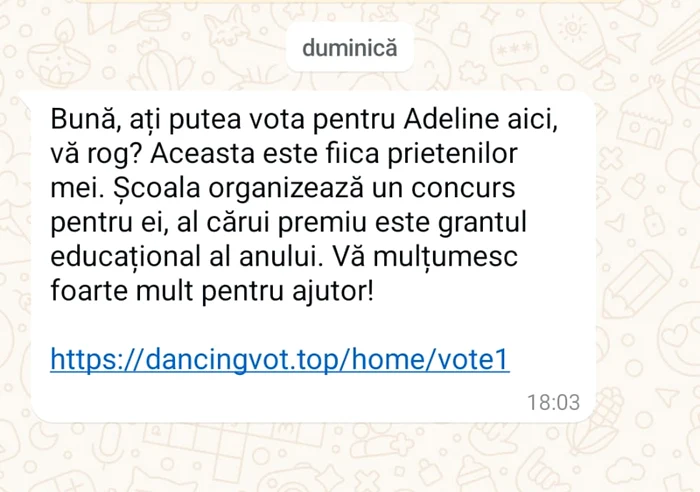
A similar message has claimed victims on WhatsApp in recent weeks. PHOTO The truth
“Following this stage, on the WhatsApp application on the victim’s phone, a code is received for pairing a device, which the victim enters in the pop-up window, at which point he remains under the impression that he has voted. In reality, the user gave the attackers access to his WhatsApp account. Later, it will find that unauthorized messages have been sent to the entire contact book and that the account is also in the possession of the attackers. It was also found that the WhatsApp account was suspended, as a result of spam actions or after close people informed the victims”, says DNSC.
“Can you lend me 1800 RON?”
The National Directorate of Cyber Security states that after pairing the devices, the messages sent were of two types: either they replicated the initial message, thus the attackers trying to compromise other WhatsApp accounts with the same method, or they were urgent, messages requesting money, usually the amount of 1800 lei. The message requesting money contains the text “Hello, can you lend me 1800 RON? I need it on my card or Revolut, I’ll give it back to you tomorrow”, after which a username corresponding to the Revolut service is made available, stating the urgency with the message “There is another name because they blocked my account, but I urgently need to make a payment on this account. Thank you very much!”.
“Couldn’t you transfer another 2000 there?”
DNSC points out that, if the victim sends money, the attackers persist and come back with a message requesting an additional amount of money, i.e. 2000 RON, the trap message being the following: “Sorry to bother you again, couldn’t you transfer another 2000 there? I miscalculated a bit, I’ll return it all to you tomorrow.”
Impact
- Accessing the fake site sent by the attackers and providing the authentication code can lead to your account being compromised.
- Compromise of your account endangers the list of contacts with which the account is associated.
- Account hijacking by attackers can lead to account banning for spam.
- If you comply with the attackers’ requests and make the transfer, you may suffer financial damage without the possibility of recovering the funds.
How to protect yourself
- Think logically, read carefully when you receive a message and do not act in haste.
- DO NOT click on links in text messages from unknown sources. Do not call incoming phone numbers or reply to such suspicious messages.
- Never provide sensitive information via SMS.
- Be wary of text messages that ask you to take immediate action or make urgent payments.
- Check device pairing and delete all paired devices.
- Enable two-step authentication (2FA) to add another layer of security to your account and prevent them from being linked in the future.
FIX
What to do if you think you’ve been the victim of a smishing attack
- If you still have access to your account, go to the Settings section, then select ‘Linked Accounts’ and remove unknown devices from the list, then enable two-step authentication (2FA) if you haven’t already already.
- If you no longer have access to your account, you will need to contact the Help Center to take the necessary steps to recover your account. The DNSC team has also made available to the general public a guide dedicated to securing and recovering the main social media accounts, which you can access and download from the dnsc.ro website: https://www.dnsc.ro/pagini/ghid- social networks
- Contact your bank immediately if you have provided card or login details to your account, or if you have made a payment to the attackers.
- Notify the person whose identity is being used in a variety of ways to help resolve the confusion caused by the fraud as quickly as possible.
- As soon as you regain access to your account, send a message to the people who received spam from the attackers on your account to avoid falling into the same trap.
- Help spread awareness in this case! The more users are informed about this attack scenario, the smaller the number of potential victims will be
- Report the incident to the DNSC (via the PNRISC platform or by calling 1911) and to the Romanian Police (petitiț[email protected]) if you have suffered financial damage.
- Train yourself to avoid the main threats from the online environment on the website of the national awareness project saberiaonline.ro.