
If you’ve ever tried to shop for a laptop online, you’ve probably noticed how complicated this seemingly simple decision can become. You have thousands of models to sort through with different specifications: processors, video cards, memory, screen types, SSDs or, more recently, AI technologies. For someone who doesn’t constantly follow industry news, the choice can quickly become overwhelming.
The reality is that the way we use laptops is changing rapidly. If in the past we needed them for surfing the Internet, editing documents or streaming video, today more and more applications use artificial intelligence. That’s why when choosing a new laptop, it’s worth thinking about the future.
One of the safest investments for the coming years is an ASUS laptop equipped with an NVIDIA GeForce RTX 5000 series GPU based on the NVIDIA Blackwell architecture. These laptops aren’t just powerful for gaming or content creation, they’re also designed to run local AI – a trend that’s becoming increasingly important when it comes to data security and privacy.
The AI revolution has already arrived on your personal laptop
You’ve probably heard of ChatGPT, Claude, Gemini, used AI assistants to write emails or summarize documents. But did you know that these capabilities can work completely locally, on your laptop, with no Internet connection, no monthly costs, and no security risks?
This is where the crucial difference comes in: to run advanced AI models locally, you need a powerful GPU. Not every video card can handle the complexity of modern neural networks. That’s why NVIDIA’s new GeForce RTX 5000 series, based on the Blackwell architecture, is a complete game changer for everyday users who want to take advantage of the benefits of Artificial Intelligence.
Why the GPU is key to AI running locally
Unlike ordinary tasks where the processor (CPU) is sufficient, artificial intelligence requires the massive power of the GPU. Large-scale linguistic models (LLMs) such as ChatGPT, AI assistants for images, or AI productivity tools process billions of calculations simultaneously, in parallel – exactly what a high-performance modern GPU does.
GeForce RTX 5050, 5060, 5070 GPUs aren’t just fast – they’re specially optimized for AI. They include dedicated Tensor cores that dramatically accelerate machine learning operations, making it possible to run complex AI models even on a laptop.
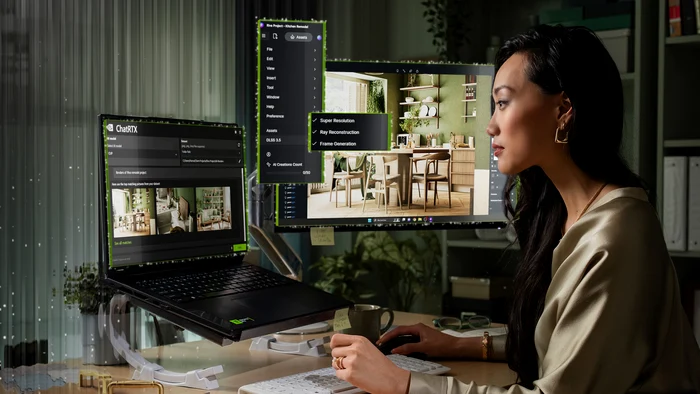
RTX AI brings you your intelligent personal assistant, completely free
What exactly does it mean to have RTX AI on your laptop? Here are some concrete benefits:
Zero recurring costs: Cloud AI services (ChatGPT Plus, Claude Pro, etc.) are available by paying a monthly subscription. With local AI running on a GeForce RTX 5000 series GPU, you pay for your laptop once and use unlimited AI for free forever.
Works without Internet: On the plane, train, areas without WiFi or when the connection drops – your local AI is always working. You no longer depend on external servers or the stability of the connection.
Total security and privacy: Your data never leaves your laptop. Sensitive documents, personal information, confidential projects – everything remains 100% private. No company analyzes them without your knowledge, no security breach can expose them.
No usage limitations: Cloud services limit the number of questions per day or the complexity of answers. Locally, you can run thousands of queries, for large projects, without any restrictions.
Instant speed and response: No network latency, no queuing on busy servers, your questions are answered immediately, which makes a difference in productivity.
What you can do with local AI in everyday life
Local AI isn’t just a tech toy – it’s a practical tool that saves you hours:
Work assistant: Summarize long documents instantly, generate responses to emails, create reports and presentations, analyze data and provide new insights you might never have thought of.
Learning and research: Explain complex concepts, help with homework, translate technical texts, check grammar and writing style in real time.
Programming and technology: Generate code, detect bugs, explain functions, convert code between various programming languages.
Creativity: Generate ideas for content, help with creative writing, provide feedback for projects, create product descriptions, and can unlock you when inspiration seems to have left you.
Personal organization: Plan activities, organize information, answer general questions, function as a personal assistant available 24/7.
Which GeForce RTX 5000 Series GPU is right for your AI needs?
Choosing the right GPU for running AI locally determines the complexity of the models you can run and implicitly their performance:
GeForce RTX 5050: The perfect entry point into the world of local AI. It can run small and medium AI models very well – enough for most productivity tasks, writing assistance, document summarization and general queries. Ideal for students, freelancers or regular users who want to experiment with AI without requiring a huge investment.
GeForce RTX 5060: The best choice for most users. It runs more complex AI models, includes more video memory, essential for running AI locally, and provides excellent speed even for intensive tasks. Perfect for professionals who use AI daily at work or students in technical majors.
GeForce RTX 5070: For professional users and those who want to run the most advanced AI models locally, this GPU offers the ability to run large models, multiple AI processes simultaneously, and impressive processing speeds. The investment pays off quickly if AI is part of your daily workflow.
NVIDIA Max-Q: AI power in an ultraportable format
A huge advantage of the Blackwell generation is that NVIDIA Max-Q technology enables advanced AI to run on thin and light laptops. It is no longer necessary to carry a 3 kg “workstation” to benefit from the power offered by the latest AI models. ASUS GeForce RTX 5000 series laptops weigh between 1.5-2 kg and fit effortlessly into a small backpack.
You can practically enjoy the benefits of a powerful AI assistant anywhere – in the coffee shop writing articles, on the train preparing presentations, at home working on projects, or on your business trips. Mobility no longer means compromise on performance.
The other important components to be able to run local AI
While the GPU is crucial to AI, a balanced system also requires careful selection of the other main components:
RAM memory: We recommend a minimum of 16GB, ideally 32GB for larger AI models that do not fully fit into the GPU’s VRAM memory. More RAM means you can run more complex models or process longer documents.
Fast storage: A minimum 1 TB NVMe SSD is recommended to store AI models (which can take up 5 – 50 GB each, maybe more) and to quickly load them into GPU VRAM.
processor: A modern CPU (Intel Core i7/i9 or AMD Ryzen 7/9) with at least eight physical cores will be able to run general tasks and data preprocessing without annoying delays, before serving them to the AI assistant.
Recommended ASUS laptops to run local AI
ASUS offers three excellent lines of laptops equipped with the new NVIDIA GeForce RTX 5000 GPUs:
ASUS TUF Gaming: The best value for money for local AI, featuring a robust build, excellent cooling important for sustained AI processing, and an affordable price make the ASUS TUF Gaming the perfect choice for a GeForce RTX 5050 or 5060-equipped laptop.
ROG Strix: The perfect balance for professionals, offering high-quality screens, premium construction, excellent performance, configurable with GeForce RTX 5060 or 5070 GPUs, they are the choice of those who use intensive AI in the office.
PLEASE Zephyrus: Top-of-the-line ultraportable for local AI, a true engineering feat resulting in the world’s thinnest gaming laptops, with maximum performance in an incredibly compact form factor. They are the perfect host for the GeForce RTX 5070, true AI workstations in a 1.5 – 2 kg chassis.
Investing in the future dominated by AI
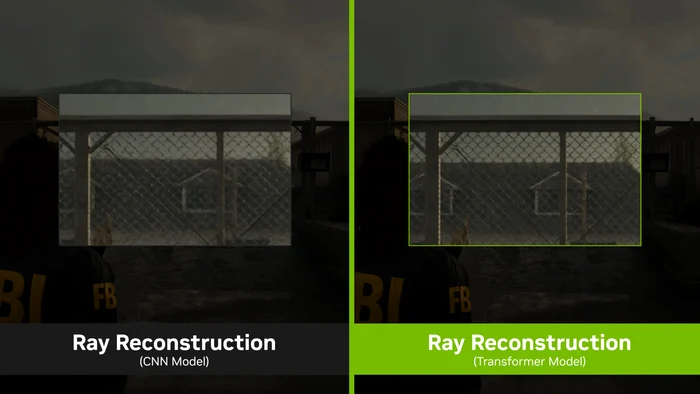
A laptop with a GeForce RTX 5000 series GPU is ready for the future of AI. AI models are evolving rapidly, but NVIDIA Blackwell GPUs are designed to run them natively. Furthermore, NVIDIA provides ongoing support: new optimizations, updated drivers, and new technologies, such as the transformer model in DLSS 4.5, are available for all RTX GPUs, not just the latest models.
In the next 3-5 years, Artificial Intelligence will become increasingly integrated into the software we use every day. A laptop with a GeForce RTX 5050, 5060 or 5070 bought today will also run AI applications smoothly for several years, protecting your investment.
You can buy right now an ASUS laptop with NVIDIA GeForce RTX 5000 series GPU available from the stock of the ASUS Romania online store and enjoy the technology of the future today. Don’t forget that you can then register your product for free and enjoy additional protection against accidents with the ASUS Perfect Warranty at no extra cost.