

The new tendency of the generation gen of “polyworking” – simultaneous management of several jobs – creates new challenges in cyber security, each additional role increasing the risk of attacks on people and corporate networks.
The Multijob work style comes with increased cyber security risks. Photo archive
From the second half of 2024 to the first semester of 2025, Kaspersky’s cyber security specialists have detected over 6 million masked attacks in working tools, as well as scams that showed up job offers such as Inded, Glassdoor and the like.
For genus z, having only one job is no longer the norm, but the exception. Although the concept of juggling with multiple jobs is not completely new, this generation (born between 1997-2012) accelerates the tendency of Polyworking. The term refers to the simultaneous combination of several sources of income: freelance, personal projects, part-time or full-time jobs. According to public research, almost half (48%) of the representatives of GEN Z already have a secondary job – the highest percentage of all generations. However, although Polyworking brings autonomy, flexibility and financial resilience, it also opens the door to new cyber security risks-many of which Z.
Too many tools, too little control
Managing several roles means browsing in an increasingly complex digital environment. Each additional job comes with new inboxs, project management tools, communication platforms and external contacts. For users like Z, this can mean dozens of simultaneous applications and accounts – from Microsoft Teams and Outlook, Slack, Zoom and Notion.
Although these platforms are created to facilitate collaboration, they dramatically increase vulnerability to cyber attacks. Offenders can capitalize on this complexity, sending phishing emails from compromised accounts, malware hidden in false calendar invitations or malicious links through legitimate chats, so they appear from real colleagues. The more tools are used, the harder it is to verify each interaction-creating the perfect environment for blackmail, social engineering and accidental breaches.
In the second half of 2024 and the first semester of 2025, Kaspersky experts detected 6,146,462 attacks in platforms or content associated with 20 popular working tools. The most targeted were zoom (3,849,489), Microsoft Excel (835.179) and Outlook (731.025), followed by OneDrive (352.080) and Microsoft Teams (151,845).
In one of the numerous scams, users were invited to download a supposed zoom update from a phishing page, which was actually a disguised malware.
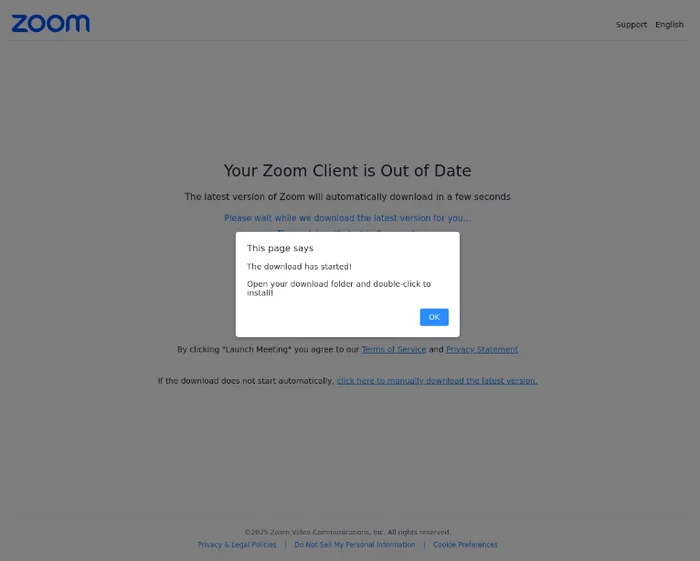
Example of phishing page that offers the opportunity to download “the latest version of zoom”
Job platforms
With the emergence of many income obtaining platforms and increasing the use of traditional job sites, cyber risks are also intensified. While Gen Z explores opportunities on Fiverr, UPWORK, Behance or LinkedIn, they become more and more frequent targets in legitimate work offers. Between July 2024 and June 2025, the experts detected over 650,000 attempts to access phishing pages disguised in LinkedIn. The scammers take advantage of the speed and informality of the freelance culture, sending fake recruitment emails, infected contracts or tempting messages with malicious links.
Examples of phishing pages with job offers
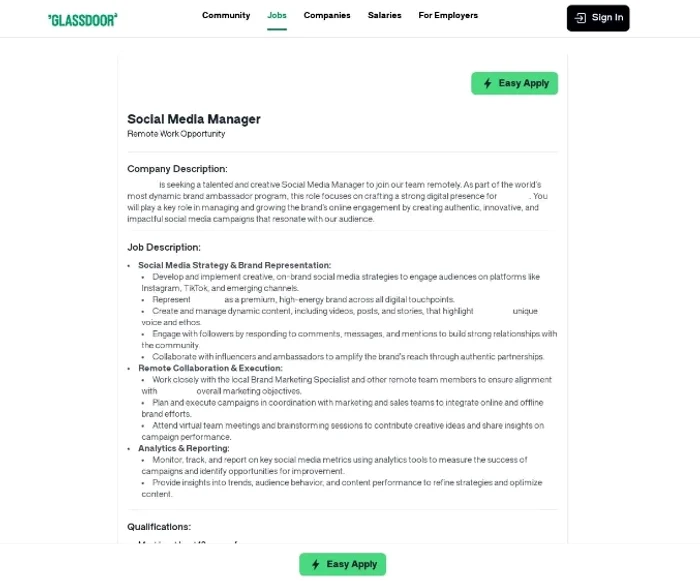
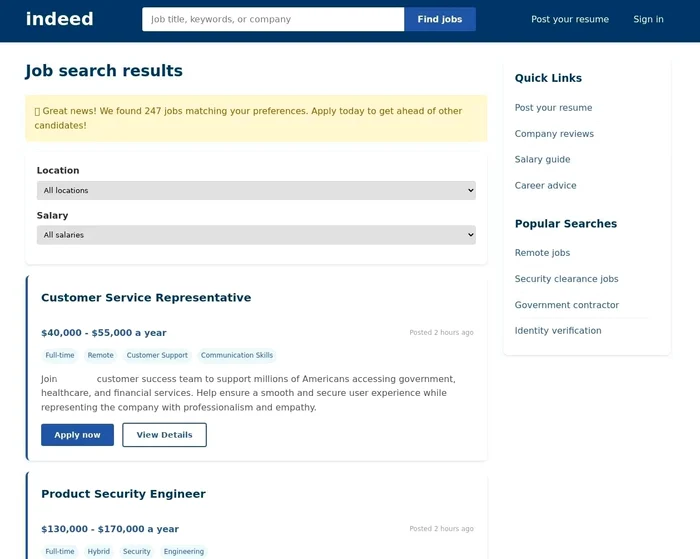
The large volume of communication that the Z generation receives through inboxes, electronic messenger and work platforms increases the attack surface, facilitating the unobserved passage of cyber criminals. Which may seem like a promising opportunity for a freelancing job, it could, in fact, be a trap designed to steal authentication data, implement malware or compromise payment information.
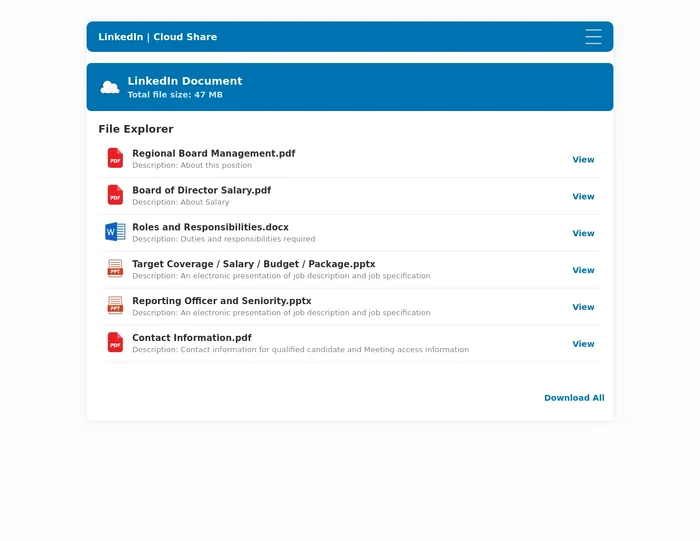
To access the files with a job offer, the user is asked to connect to LinkedIn – not on the official version, but on a phishing page.
Precarious hygiene of passwords
Managing access to an increasing number of platforms-from project tools and frelancers to freelancers to payment systems and internal workspaces-often leads to shortcuts. In the rush to remain productive in several jobs, genus Z employees can frequently reuse their passwords or resort to simple, easy to remember combinations. Although convenient, this practice dramatically increases the probability of compromising accounts. A single weak or reused password for access to several platforms can serve as an entry gate for cyber criminals, allowing them to move laterally between accounts, steal sensitive information or even launch additional attacks using the victim’s identity.
Personal devices and Shadow IT
The situation is complicated even more than the way the devices are used. Many Polyworkers Gen Z operate in several projects using the same personal laptop or smartphone – without separation between work and personal. This overlap causes sensitive customer files or corporate access data to be easily stored on unsecured devices or in public storage solutions such as Google Drive or Dropbox.
In some cases, Polyworkers also install unauthorized software or browser extensions to make their multitasking more efficient-a practice known as Shadow IT. Although short -term useful, these unauthorized applications may have unclear vulnerabilities or policies, increasing the attacking surface for all jobs. The danger is not limited to individual freelancers. A single compromise account, such as access to Fiverr or a phishing incident by email related to a secondary project, can trigger much larger breaches if the same credentials are also reused for corporate systems. For organizations that employ remote contractors or allow the use of their own devices (Byod), it raises serious questions about endpoint security and credential management.
recommendation
To avoid becoming victims of cyber criminals, cyber security specialists recommend:
• Separation of work and personal media: Use different devices for personal and professional activities, to reduce the risk of cross contamination.
• Attention to false tool updates: Download work applications such as Zoom or Teams only from official sites or from trusted developers apps-not from third-party links or emails.
• Use strong and unique passwords and avoid reusing them on several platforms. Use a password manager to generate them and store them safely.
• Avoid installing unofficial extensions or applications for productivity, unless they are verified and approved – especially on work connected.
• Check urgent messages or unknown contacts. Phishing is often based on decisions taken in a hurry.
• Enable Multifactor (MFA) authentication, especially for email, cloud storage and freelancing platforms.